
First steps
Sheet Tailor has two ways to make the sheet yours. You can use both in the same world, and even on the same character.
| Customize the system's sheet | Freeform Sheet | |
|---|---|---|
| Starting point | The sheet you already use | A complete sheet generated by the module |
| What you change | Position, size and colors of the blocks, artwork behind | Everything: each field goes wherever you want, on as many pages as you want |
| How it works | It is the system's own sheet | The system's rolls and items; the original sheet stays in the last tab |
| Best for | People who like the system sheet and only want to adjust it | People with a drawn sheet, or who want to build their own |
Path 1: customize the sheet you already use
- Open the character with its usual sheet.
- Click Customize sheet at the top of the window. On the D&D 5e sheet, it is in the menu at the top of the window, behind the three-dot button.
- Click a block of the sheet to select it and drag it. The corner handle changes its size.
- In the Artwork section of the panel, pick an image, GIF or video to go behind the sheet.
- Click Save customization.
Everyone who can open the sheet sees the customization. The full guide is in Customize sheet.
Path 2: the Freeform Sheet
- At the top of the character sheet, click Sheet (on D&D 5e, Configure Sheet, inside the three-dot menu).
- In This Sheet, choose Freeform Sheet (custom layout) and save.
- The sheet opens ready to play, with the same tabs as the system sheet. The last tab, Standard Sheet, is the original sheet, working as usual.
- To change the look, click the ruler and pencil button, Edit layout, at the top of the window.
- In Background and size, choose the page image and drag the elements onto the artwork.
- Click Save layout.
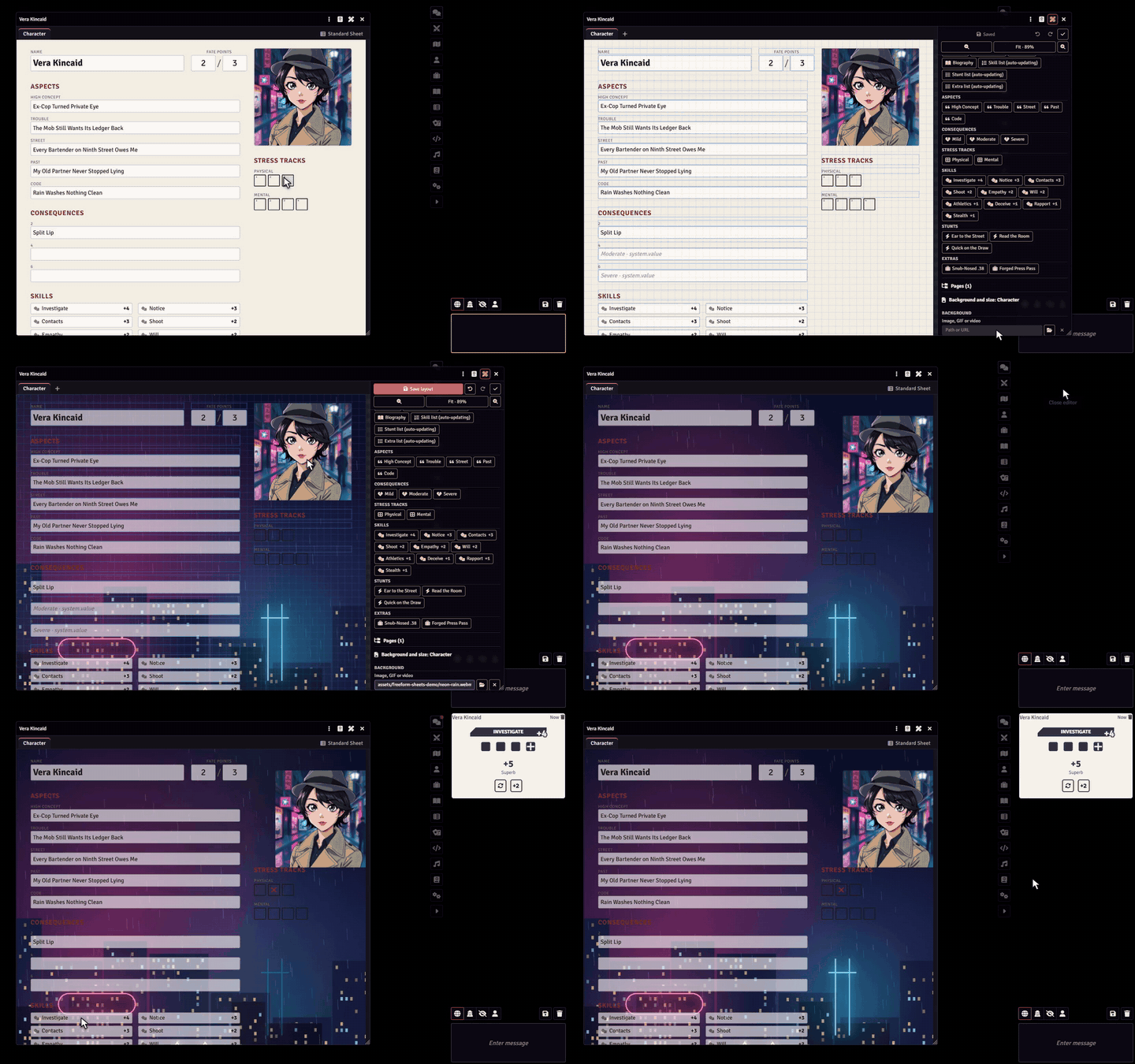
To learn more, start with the Freeform Sheet overview.
Who can do what
- Each player customizes and builds the sheets of the characters they own. The GM can change all of them.
- The GM can keep editing to themselves: in Game Settings → Configure Settings → Sheet Tailor, set Who can edit sheet layouts to GMs only. Players keep using their sheets as usual.
- To upload images from their own computer, a player needs permission to use Foundry's file browser. Without it, they can paste an image address (URL).
More details in Settings and permissions.