
Settings and permissions
Module settings
The settings are in Game Settings → Configure Settings → Sheet Tailor.
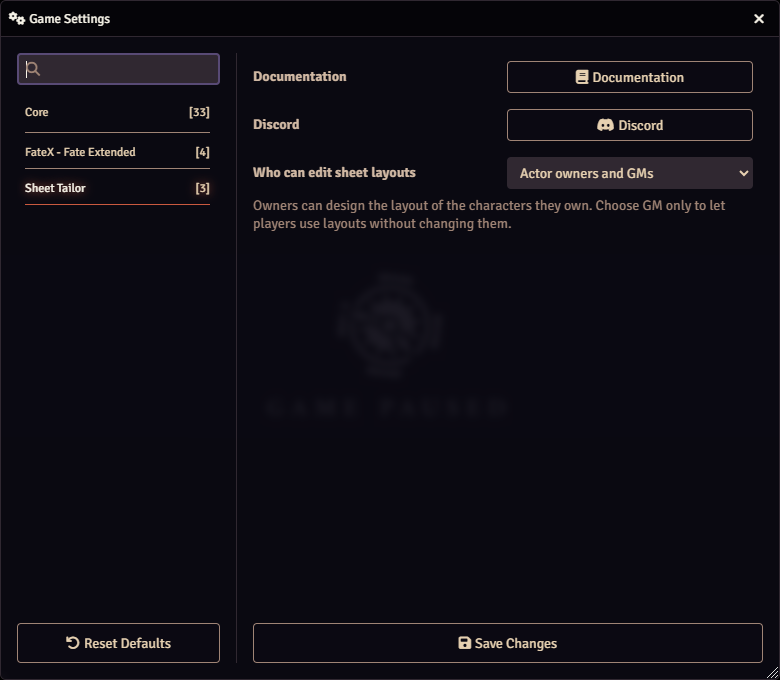
| Setting | What it does |
|---|---|
| Who can edit sheet layouts | Actor owners and GMs (default): each player builds the layout and customizes the sheet of the characters they own. GMs only: only the GM edits; players use the sheets as usual, without the ruler and pencil button and without Customize sheet. |
| Documentation | Opens this documentation, in Portuguese when Foundry runs in Portuguese and in English otherwise. |
| Discord | Opens the invite to the community on Discord: support, news and suggestions. |
Who can do what
| Action | Who can |
|---|---|
| See the layout and the customization | Everyone who can open the character's sheet |
| Type, tick and roll on the sheet | Those who can edit the character (the owner and the GM) |
| Edit the layout and customize the sheet | Owners and the GM; only the GM, with GMs only |
| Save customization templates for the table | The GM only |
| Apply a customization template | Any owner, on their own character's sheet |
| Choose the Freeform Sheet for a character | Whoever can configure that character's sheet; to make it the default sheet of a type, the GM |
Uploading images
Choosing an artwork with the folder button uses Foundry's file browser. For that, the player needs the Use File Browser permission and, to send new files, the Upload Files permission. The GM grants both in Game Settings → Configure Settings → Core → Configure Permissions.
Without these permissions, a player can still paste an image address (URL) into the background field. The address must be reachable by every player, not only by whoever pasted it.
Where the data lives
| What | Where |
|---|---|
| Freeform Sheet layout | On the character |
| Customization of the system sheet | On the character |
| Custom values | On the character |
| Customization templates | In the world |
| Open tab of the Freeform Sheet | In each person's browser |
Since almost everything lives on the character, duplicating, exporting or keeping the character in a compendium takes the layout along.